Showing posts with label Photoshop. Show all posts

Tuesday, February 19, 2013

Cosplay Progress - Final Fantasy XIII-2 Serah Farron, Photoshop


TadA!  My cosplay is complete (although you guys may have seen it ages ago on the blog from the SakuraCon post back in April,) but here's my final post about making this cosplay.  Actually it's the post processing of this photo to make it internet worthy.


As you can see here below here is the original photo I took.  I used a timer and had to run back and forth trying many different poses and whatnot.  I probably took 40 pictures and only ended up with a handful I liked.  So how did I turn the bottom photo into the top photo?

  • Layer 1, the original photo. 
    • I didn't actually do any manipulation here
  • Layer 2, the border
  • Layer 3 Logo
    • I took the Final Fantasy XIII-2 Icon from online, removed the excess background
  • Layer 4, the color
    • I overlayed a pink color with a 20% transparency

Wednesday, May 23, 2012

Photograph Assassin's Creed: Part 4 ColoUr Contrast

What's up with the coloUr? You might have already noticed my photos don't look quite natural in color, and I wanted to share with you how I did it.


First I augment the tone of the photo a little to the yellow/brown color.  This gives it a bit of the aged photos look, since these characters were from historical times.


Some photos I darken slightly to give it a somber look


Some photos I lighten to give it a a faded sun bleached look.  Once again to give it the photo an aged look.


Than I boost the contrast to make the light colors lighter and the dark colors darker.  This gives the object's shadows a darker frame which brings out a outlining drawn look.


Than I boost the saturation just to make sure the coloUrs pop a little extra for that added artistic feel


Thursday, June 16, 2011

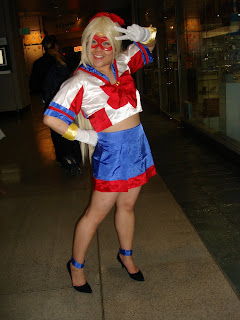
Cosplay Week Sakura 2010 #4 - Sailor V Manga Cover Tutorial


What's more awesome than cosplay photos?  Making cosplay photos look like trading cards or Manga covers!  "woot woot"  So here's my photoshopping tutorial on making a manga cover using a Photo I took at SakuraCon.


Start with a good cosplay picture.
Also start with a good Manga picture as a guide

From that Manga picture I stripped out the Title (Sailor V) and additional text, in this cause the author's name

I layered a blurred version of the title to give it some depth

Now cropping out the cosplayer and resizing for this project.

Adding a colourful background.  A lot of manga covers might just have some colourful but not extremely busy background so to not distract you from the focus character.


For the SailorV covers I noticed the artist liked using lots of action lines to draw towards the super hero.  So I'm adding some here.


Adding the white bubbles, I also noticed the artist likes to do that with a lot of her manga series.


Adding more emphasis with the action lines drawing focus to the center.


The colouring of the cosplay was a little dark, lighting up the colours so match the background feel.


Adding in the words


Generated the cropping lines by aligning the original manga picture with the words. 

TaDa!